✨ New & improved
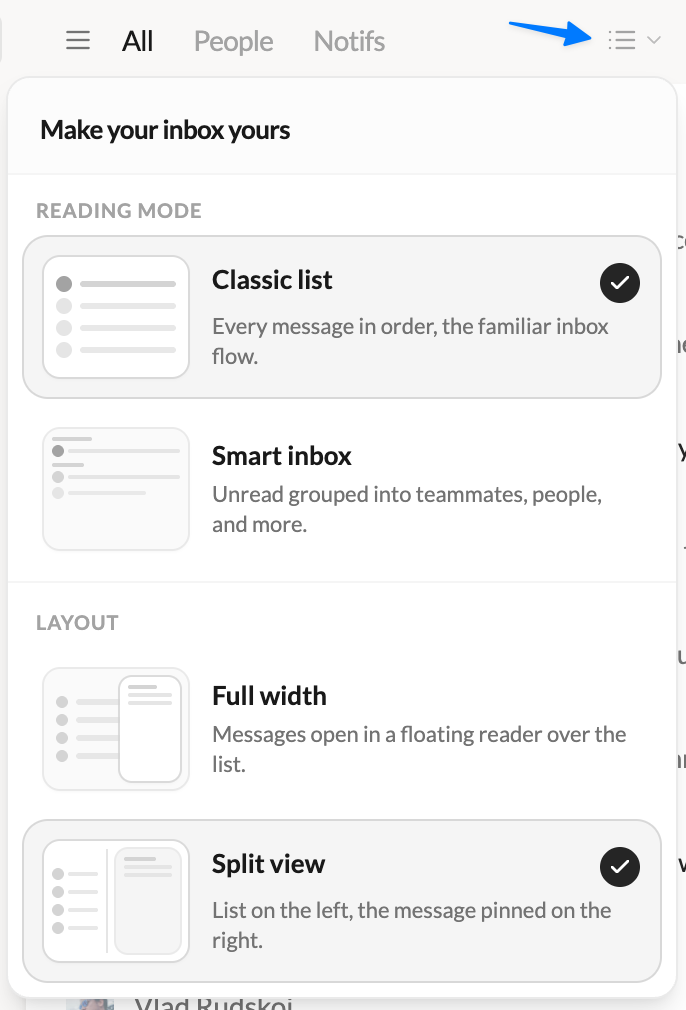
- 🪟 Introducing Split View — A brand-new way to read your email. Keep your list pinned on the left and open messages right beside it, side by side. Drag the divider to size each side exactly how you like. Prefer the classic full-width list with a floating reader? That’s still here too — pick your favorite anytime.
- 🎛️ Choose your layout in one click — A redesigned switcher in the inbox lets you flip between Full width and Split view, with a visual preview of each. Your choice is remembered.
- 📇 A smarter conversation list — In Split View, threads get straight to the point: subject, preview, participants and message count at a glance. Avatars and counters only show up when they actually help.
- 🎚️ A sender panel that gets out of the way — Collapse the contact panel with a click for maximum reading space, and bring it back whenever you need it.
- ✍️ Compose from anywhere — The “New message” button now follows you into the header when the sidebar is collapsed. Never more than a click away from writing.
- 🖊️ Pick your signature with confidence — The signature picker now opens in its own window with a full preview of every signature, so you see exactly what you’re sending — or choose none.
🐛 Fixes & polish
- Dark scrollbars at last — Scrollbars now follow dark mode on Windows and Linux.
- Clearer filters — “Unread” and “Archived” are now “Unread only” and “Archived only”.
- Lots of small interface refinements for a smoother, more consistent experience.
💬 Tell me what you think
Loving it? Something feel off? I read every message — write to me directly at [email protected].
