Custom shortcuts, and Outlook Calendar
⌨️ The big one: your shortcuts, your keys
If someone had told me the biggest pressure on features would be the dark theme and custom shortcuts… Dark mode shipped a while ago. This release is the other one.
Every shortcut in Settings → Shortcuts can be rebound. Click one and press the keys you want: a single chord, or two keys in a row, like G then H. Add an alternative when you want the old keys and the new ones. If those keys already belong to another action, Talanoa names it and lets you take them or keep what you had. Reset one shortcut, or all of them, back to the defaults. Tooltips, the command palette and the app menu show the keys you picked.
A few stay locked on purpose. Escape still closes dialogs, Enter still confirms, and a shortcut that fires while you are typing needs a modifier, so it does not swallow the letter you meant to write. A binding recorded on one keyboard layout keeps matching on another.
📅 Outlook Calendar
Outlook calendars join Google Calendar. Add one from Settings → Calendar accounts → Add calendar, and see, create, edit and answer events from Talanoa, with Microsoft Teams links on new meetings.
- One click per view. Day, Week, Month and Agenda are now buttons side by side instead of a dropdown.
- Video calls when you want them. New events no longer add a Meet or Teams link by default, and the switch sits right under the location field. A calendar option brings back the old behavior. Booking links get their own “add a Google Meet” checkbox.
- Invitations from strangers. Answering Yes to an Outlook or Teams invitation in a Google mailbox replied to the organizer, but the event never showed up on your calendar. It does now.
🇫🇷 Talanoa speaks French
The whole app is now available in French: inbox, conversations, composer, calendar, settings, notifications and menus. Talanoa follows your system language by default, and you can pin one in Settings → General. Dates and times follow your language too, instead of the American format everywhere, with a setting to choose another convention. Missing your language? The same setting has a link to ask for it.
✨ New & improved
- One row per conversation. The inbox shows each conversation once, with its newest message and a message count next to the sender, like Gmail. A switch in Settings → General brings back one row per message.
- IMAP mail arrives in seconds. Talanoa keeps a live connection to your IMAP inbox, so new mail shows up as soon as the server has it instead of at the next check. IMAP replies also land in the right conversation more often.
- IMAP folders as a tree.
INBOX.Archive.2023is now Archive › 2023 in the sidebar, whatever separator your server uses, with collapsible parents. - Insert image. A new toolbar button puts pictures right in the body of your email. Large photos are scaled down to fit.
- No subject? Talanoa asks. Sending an email with an empty subject now asks first.
- Settings in the app menu. On macOS, Talanoa → Settings… opens the settings, with your shortcut shown next to it.
- Smart Inbox leaves your mail unread. After you archive or delete, the next email opens by itself. It now only counts as read if you stay on it for three seconds.
- Long threads open faster. The thread loads its 10 newest messages first and brings in older ones as you scroll.
- Older mail from a sender. “Load more from server” is now offered even when a sender has no email on your computer yet.
- Heavy attachments, lighter app. Attachments are stored separately from the message, so conversations full of large files open and scroll faster.
🐛 Fixes & polish
- Codex works again. With Codex as your AI, generating a reply in your voice failed: the prompt was passed as a single multiline argument, and each platform splits those differently. Talanoa now writes the prompt to a temporary file, hands it to Codex, and deletes the file once the answer is back. Thanks to the user who tracked this one down.
- Unsubscribe, block & delete. The action failed at the “delete every email from this sender” step. It works again, falls back to an email request when the unsubscribe link refuses, and the block reaches your other devices even when the unsubscribe itself fails.
Polish on the conversation
✨ New & improved
Vflips the view. One key switches the open conversation between chat bubbles and the classic list, from the thread or from a sender’s stream. The toggle in the header is still there, and the shortcut is listed in Settings → Shortcuts.- What you typed follows you. Leave a conversation mid-sentence, open another, come back: the text, the attachments and the subject are where you left them. Every conversation keeps its own draft, and closing the thread no longer throws it away.
- Links keep their words. A message saying “the brief” over a link stayed plain text in a bubble. The words are clickable again, and still open the same address.
- The gear on the sidebar. Hovering the account rail turns your photo into a settings icon, so the tile says what it hides.
🐛 Fixes & polish
- Bubble colors, reworked. Yours are violet, theirs a soft gray with a hairline edge, and dark mode keeps both in the same tonal range as the canvas instead of glowing at you.
- Dark mode on the message itself. Emails stack white tables inside white tables, and each one used to be drawn as a slightly different rectangle. They now collapse onto a single surface, gradients included, so a message reads as one flat page.
- The reply count sits once. “3 replies · Last reply…” was repeated under every message of the same thread, and went missing when the message above it was archived.
Email, read like a conversation
💬 The big one: your inbox now reads like a chat
This release changes how Talanoa shows an email thread.
Email is a conversation that forgot it was one. A thread between two people is a chat: a message, a reply, a reply to the reply. What you see is the opposite. Every message repeats the whole history, quoted and indented, plus a signature, a legal footer, a logo, a “Sent from my iPhone” and a header full of addresses. By the fifth reply, the two lines that matter are buried, and the message you opened the thread for sits at the bottom. We stopped noticing because we have read email this way for thirty years.
Building the mobile app made it impossible to ignore. Nobody pinch-zooms through quoted history on a phone. A conversation already has a shape everyone knows: bubbles, yours on the right, theirs on the left, newest at the bottom, a box to type in. We built that for mobile first. The desktop thread view suddenly looked like a fax.
So we rebuilt reading around the conversation, not the message. Open a thread you have replied to and you get a stream of bubbles. Each one shows only what that message added: quoted history, signatures, footers and “On Monday, John wrote:” are gone. What is left is the sentence the person typed. Long messages fold behind See more. Pictures sit inside the bubble, attachments under it, and dates appear once, as separators, the way they do in Messages or WhatsApp.
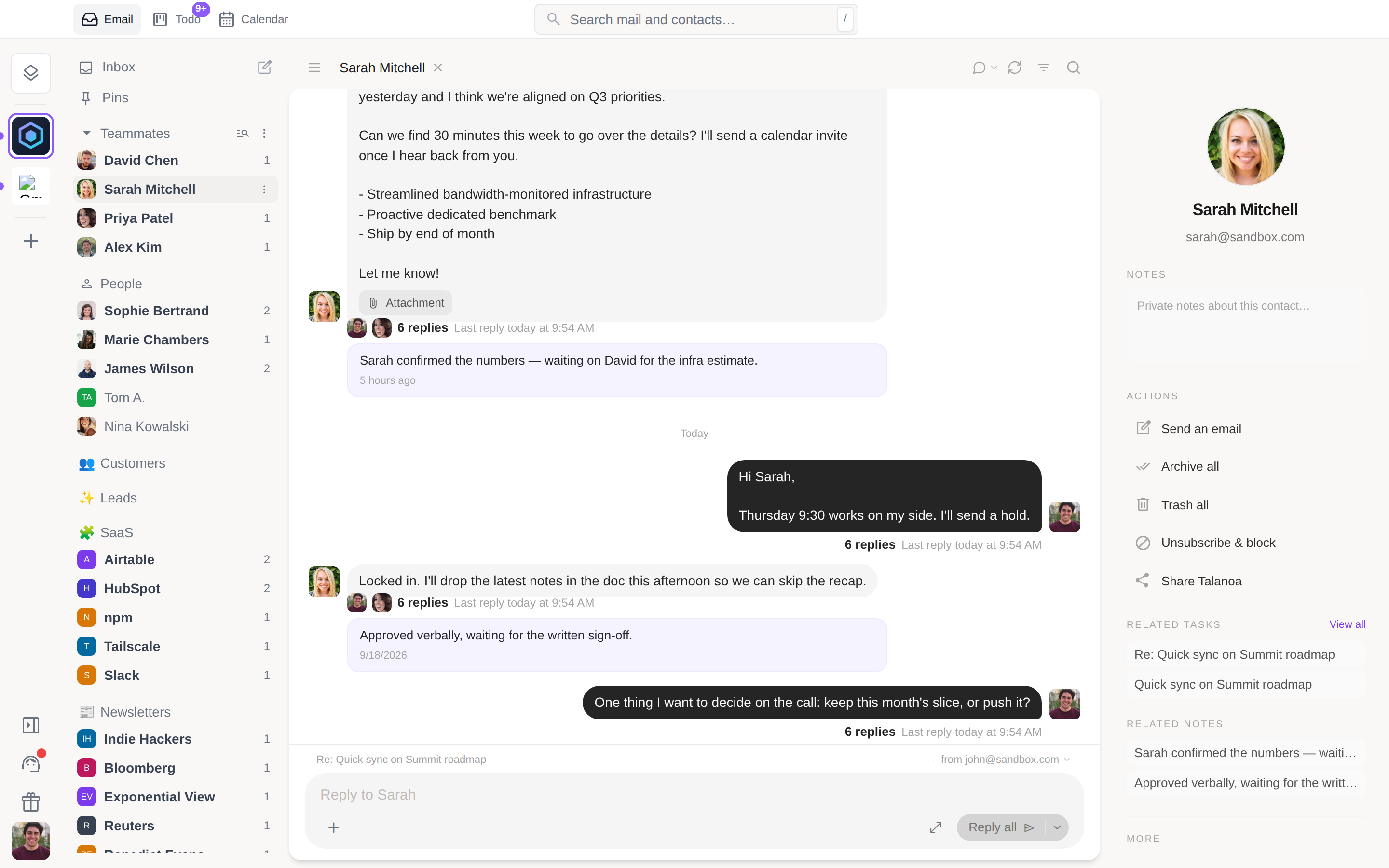
The stream is anchored at the bottom. Newest last, oldest at the top, older pages loading as you scroll back. A new message slides in at the bottom, where your eyes already are. After a week you cannot go back.
You reply from where you read. A reply box sits under the conversation. Type, hit Enter, and the message appears as a bubble right away, attachments included, with a small ring that drains over six seconds. Click it to undo: the text is back in the box. The full composer is one click away for a subject, a Bcc or a template, and everything you typed comes with you. Recipients come from the thread: a two-person conversation replies to the person, a group replies to everyone, with a Reply only switch when you want it private. Cmd+Enter or Ctrl+Enter still sends.
It works per sender too. Click a person in the sidebar and you get everything you have ever exchanged with them, one continuous conversation across subjects, reply box at the bottom. This is the view we now spend most of our day in. A colleague is a relationship, not a list of subjects.
Some mail is not a conversation, and Talanoa knows the difference. Newsletters, receipts, GitHub or Stripe notifications keep the full-width cards, newest one expanded. Bubbles only appear on threads you have written back to. Prefer the classic view? The toggle is in the header, and Talanoa remembers your choice per account.
😀 React to a message with an emoji
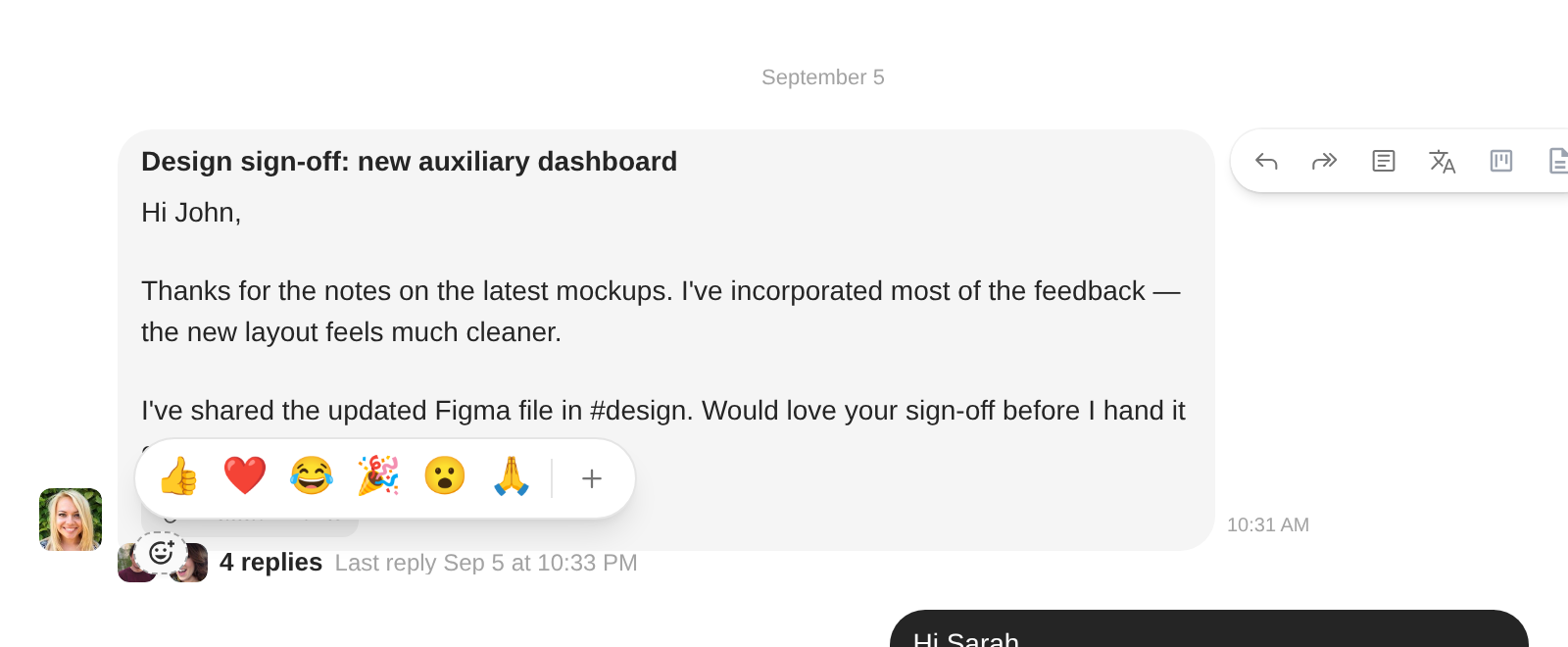
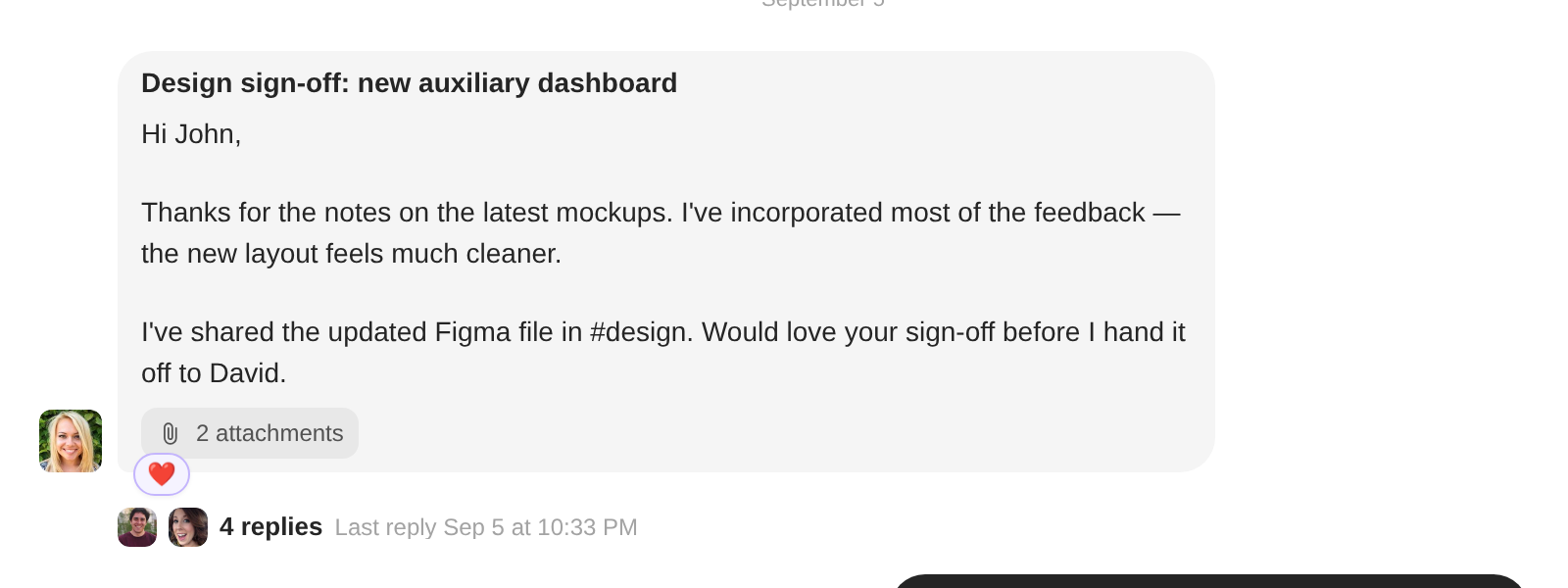
- A quick strip on every message. Hover a bubble and a small 😊 appears. One click for 👍 ❤️ 😂 🎉 😮 🙏, or the full picker. The reaction shows up as a pill under the message.
- Real email under the hood. A reaction is a tiny email to the sender, in the format Gmail understands. Gmail users see the emoji natively; everyone else gets a one-line ”🙂 John reacted” with your message quoted. Incoming reactions land as pills, not unread mail, and never bump your inbox count.
⚡ Priority: the inbox without the noise
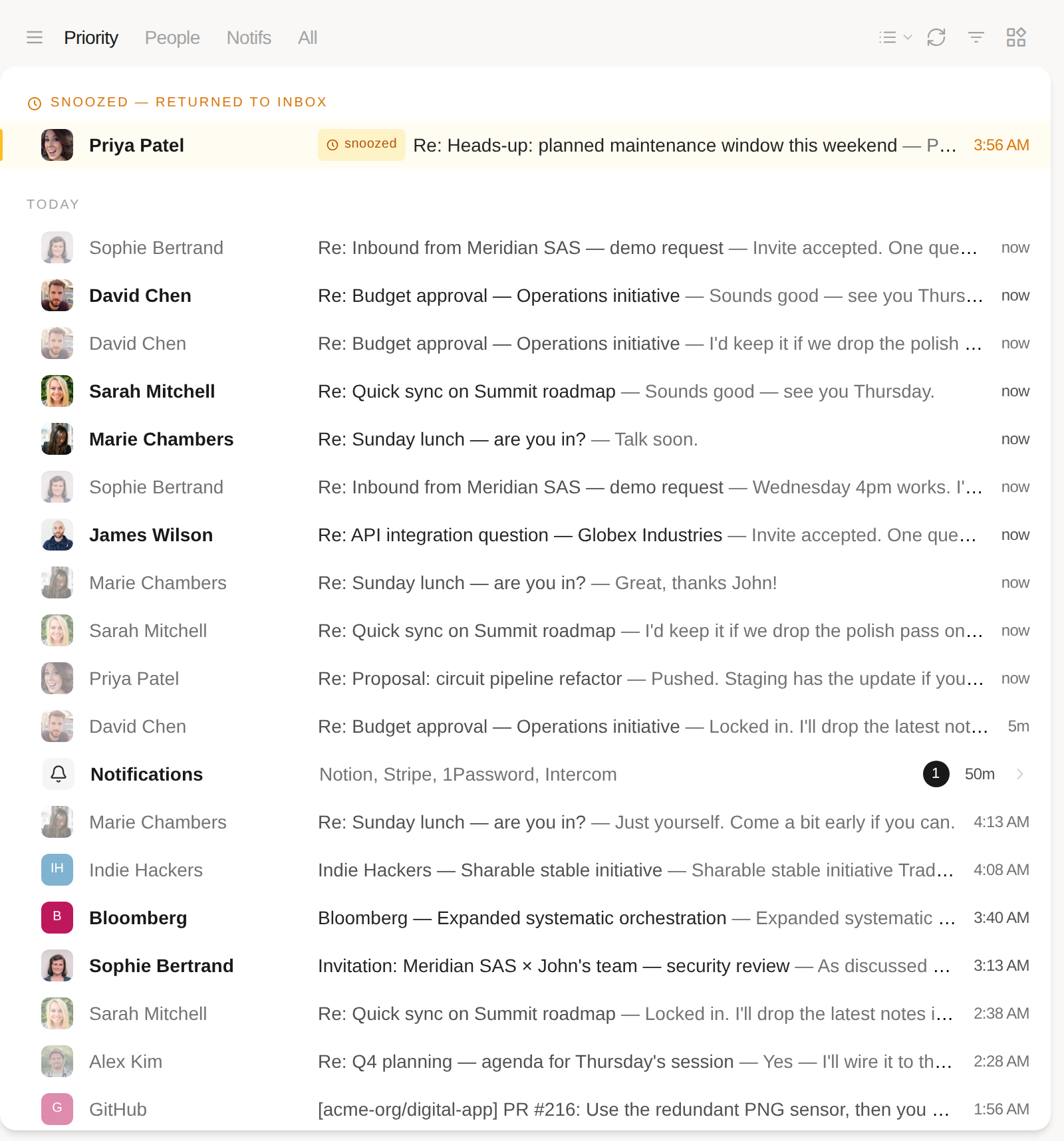
- A new first tab. Next to People, Notifs and All, Priority shows everything in your inbox except the notifications. Teammates always stay in it.
- Notifications fold into one row. The mail Priority leaves out is not hidden, it is grouped: a single Notifications row sits in the timeline at the time of the newest one, listing who sent them and how many are unread. Click it to open the Notifs tab.
- Your tab sticks. The tab you pick is remembered per account.
📅 Invitations from any calendar
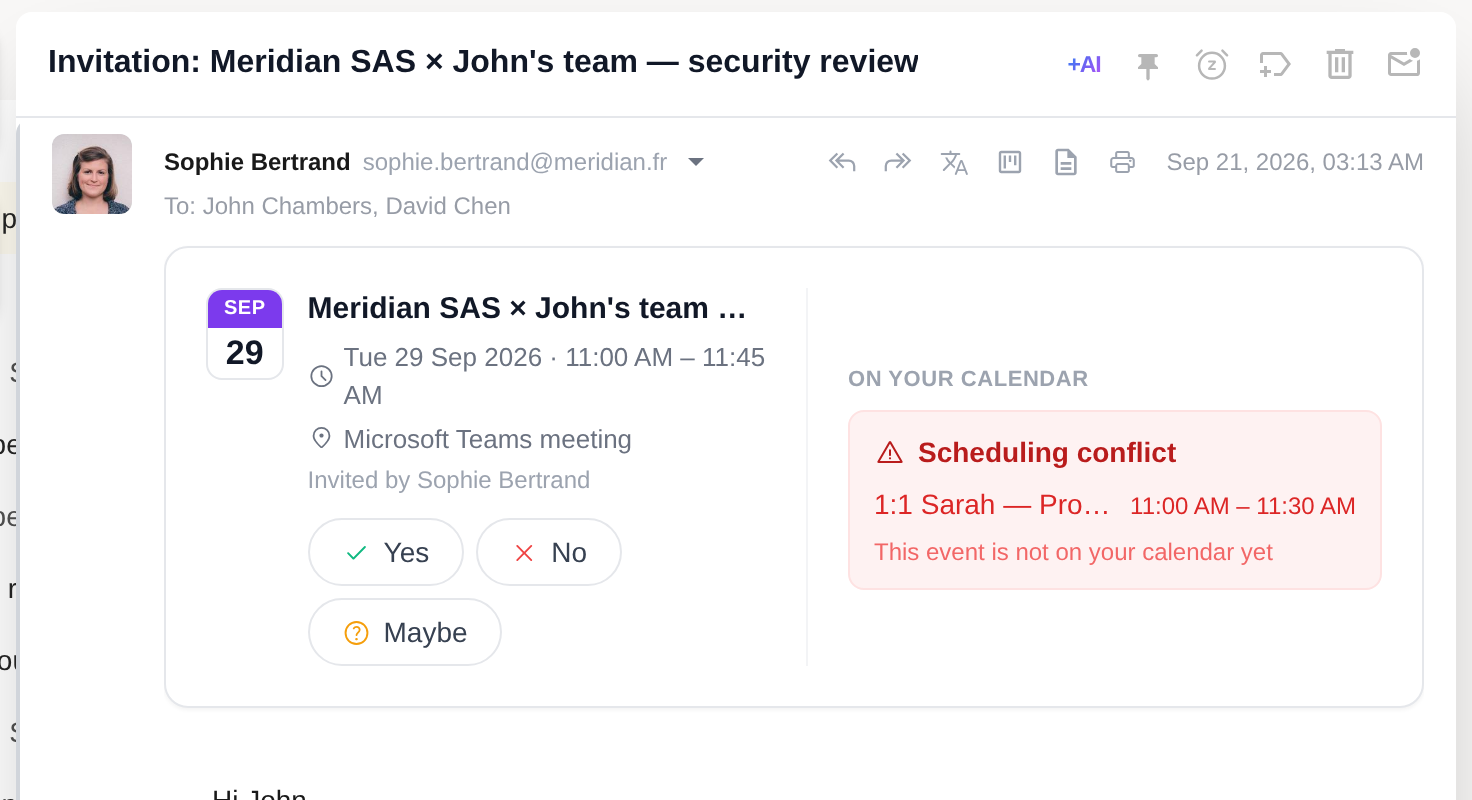
- RSVP on an .ics. Until now Talanoa only understood Google Calendar invitations. An invite from Outlook, Exchange, Apple Calendar or anything that sends a
.icswas just a paperclip. It is now a banner: the event, who invited you, Yes / No / Maybe, and the reply goes back as a proper calendar response. A published event with nobody to answer offers Add to calendar instead. - Conflict detection. The banner checks the slot against your calendar and warns when something is already there.
The mobile app already reads mail this way. Reactions and push notifications for new mail land in its next TestFlight build. If you want in, Settings → Devices → “I want to be a beta tester”.
Right-click any link, and Outlook that keeps up
✨ New & improved
- Right-click a link in an email. A proper native menu, at last: Open Link and Copy Link Address, so you can grab a URL without opening it first. Works on links in the composer and in signatures too.
- One expired account no longer drags down the others. When a sign-in expires, that account turns red in the sidebar and pauses its own sync. Every other mailbox carries on. Click the red account to reconnect, whenever suits you. No more dialog asking you to log out of everything to fix one account.
🐛 Fixes & polish
- Enter in the composer. Pressing Enter starts a real new line again, so Home and select-all go to the start of the line instead of the top of the message, and the markdown shortcuts (
-,1.,#) fire the way you’d expect. Pasted paragraphs keep the spacing they came with. - [Outlook] Sync that actually keeps going. A handful of Outlook bugs that made mailboxes stall, restart from scratch, or get stuck halfway. Large folders re-syncing on every token refresh, a second account silently reusing the first session, an interrupted first sync failing on an expired token, log reports dying on auth. Sorted.
- [Gmail] Faster syncs, quieter logs. Threads deleted for good stayed in Gmail’s change feed and were re-requested on every sync, forever. They’re skipped now.
- Opening an unread email. No more stutter as the message is marked read.
- Attachments listed once. The same file, same size, could appear twice on a message.
Write without leaving the keyboard
✨ New & improved
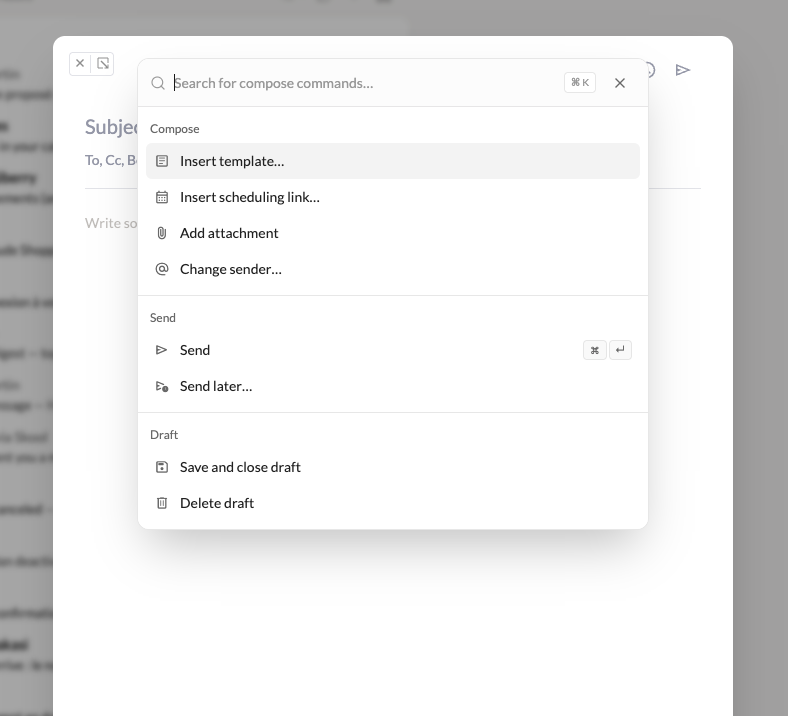
- A command palette inside the composer. Hit
Cmd+K(Mac) orCtrl+K(Linux and Windows) while writing and everything the toolbar does is one search away: send, send later, insert a template, drop in a scheduling link, add an attachment, change the sender. The point is to send an email without leaving the keyboard. Send later suggests real slots, and scheduling links propose times you are actually free.
-
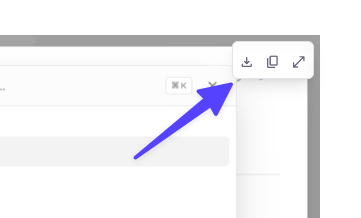
Pictures in a message behave like attachments. Hover any image for a small Download / Copy / Show original toolbar, or right-click for the same three actions. “Show original” opens the picture full size, with click to zoom.
-
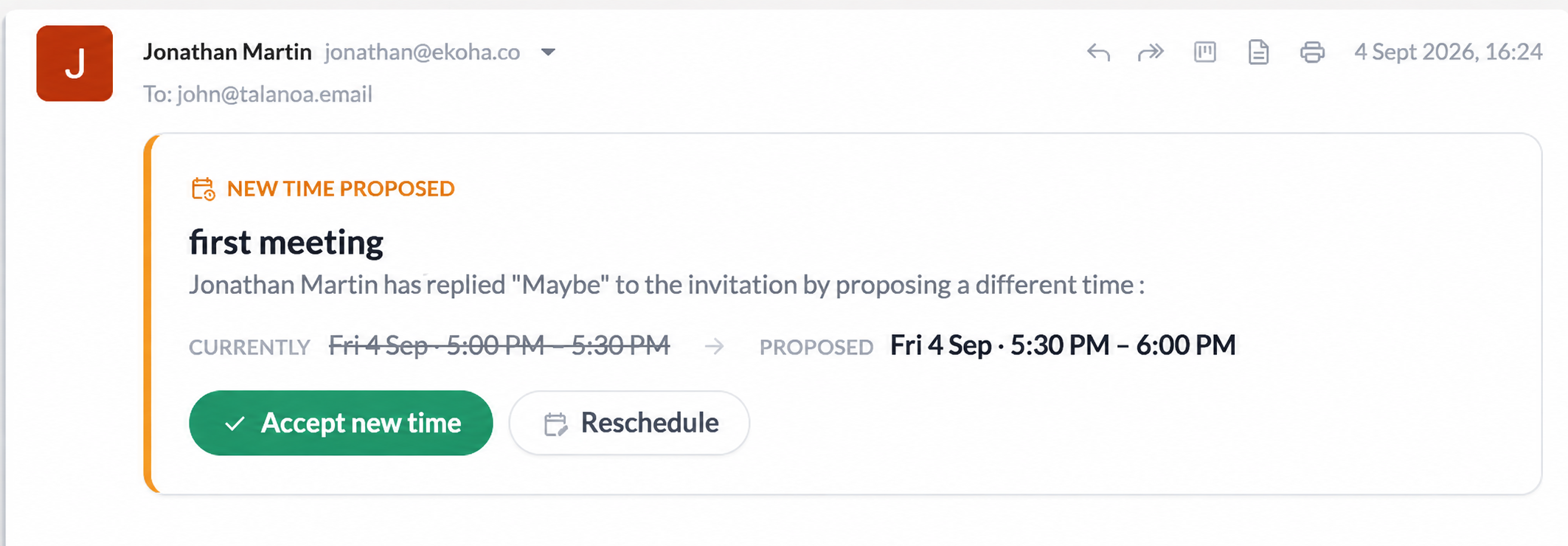
RSVP to a meeting time change from the email. When someone proposes a new slot, you can accept it right there instead of opening a browser tab.
🐛 Fixes & polish
- Bugfixes about Gmail inline images, email forwards with attachments, and the Windows installer.
Read state that stays read
🐛 Fixes & polish
- [IMAP] Read state finally sticks. Mail marked read by you or by a rule stays read after sync and when you switch inboxes.
- Infinite scroll in Today. Older messages keep loading as you scroll. If archive, delete, or the unread filter shortens the list, it loads more instead of stopping.
- Send toasts. Sent and error toasts now dismiss themselves, and every toast has a close button.
Cleaner sender cleanups, safer sends
🐛 Fixes & polish
- Attachment limits per provider. 25MB on Gmail and Yahoo, 20MB on Outlook and iCloud, 10MB on unknown IMAP servers. You get told before the send, not a bounce after.
- Send now. Skip the undo delay straight from the toast.
- Inbox only for sender cleanups. Archive, trash or done all from a sender view skips messages you’ve already dealt with.
- Notifications. No more repeated push for the same email, and new-email notifications that were silently swallowed now come through on Gmail, Outlook and IMAP.
- [IMAP] Read and starred sync. Servers without CONDSTORE now pull read and starred state back from the server, so changes made in another client show up.
- [IMAP] Attachment previews. Previews no longer mix up files between messages.
See your attachments, and your board everywhere
✅ Your board, everywhere
Your todo board and email notes now stay in sync between desktop and mobile.
- Cross-device sync. Tasks and notes follow you from phone to desktop and back. A task stays linked to the same email, whether you use Gmail, Outlook or IMAP.
- Pair a new device. Scan a QR code in the desktop app to bring your whole board to a new phone.
- Instant updates. Check off a task on your phone and see it update on desktop within seconds.
📎 Attachments & previews
Attachments are finally readable at a glance, and you can open most files without leaving the app.
- Thumbnails that mean something. PDFs show their first page, spreadsheets show a snippet of the sheet, Word files show the opening lines. No more wall of identical red badges, and everything stays sharp in dark mode too.
- Full previews in the app. Open PDFs, Excel, Word, and text files without leaving Talanoa. Search and zoom PDFs, flip through spreadsheet tabs, read documents as a page. Already downloaded files open instantly.
- Preview from inside a message. Quick view on an attachment opens the same full-screen preview as the gallery. Arrow keys flip through the rest of that email’s files; double-click and Space work too.
🐛 Fixes & polish
- Search improved New search engine implemented for better performance + remote search too.
- [IMAP] Delete or archive on one device, gone on the other. Mail you remove no longer sticks around on your other devices after a refresh.
- Unread filter stays accurate. Read emails no longer slip into the list while a sync is running.
Autocomplete that keeps up, accounts that stay connected
🐛 Fixes & optimisations
- ⚡ Autocomplete rebuilt — ~340ms → ~15ms per keystroke, all connected accounts, real names kept.
- 🖼️ Images — Ask before displaying / Always display in Settings → General (desktop & mobile); remote images actually blocked when you ask.
- ✅ Tasks — Mark complete from the board without opening the card.
- Polish — Transient auth failures no longer stick as “reconnect”; newsletter blockquotes stay visible; pasted images fit the column; monogram avatars; inbox lists update live on sync.
Boards that scale, settings that follow you
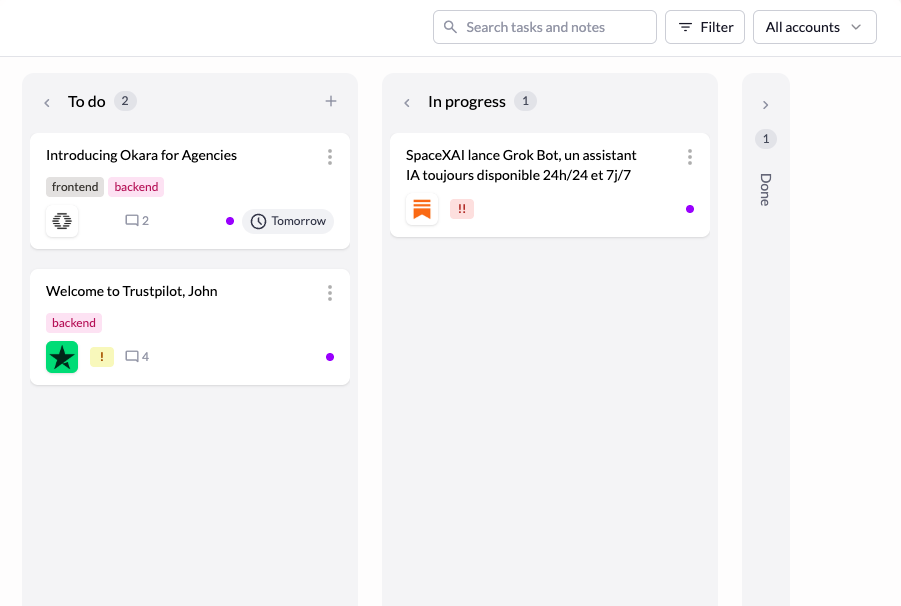
✨ New iteration on tasks
Notes, priority, labels, filters and search. Everything you need to triage tasks without leaving the board.
🐛 Fixes & polish
- 👥 Smarter recipient autocomplete — Suggests people you’ve emailed, not just incoming senders. Skips your address and noreply mailboxes. ~137ms → ~0.3ms per keystroke on a 50k-message mailbox.
- Unread filter sync — Messages read, archived or trashed elsewhere leave the list instead of staying with a stale dot. Fixed on sync and window focus.
