Notifications & Trusted Images - Stay in control
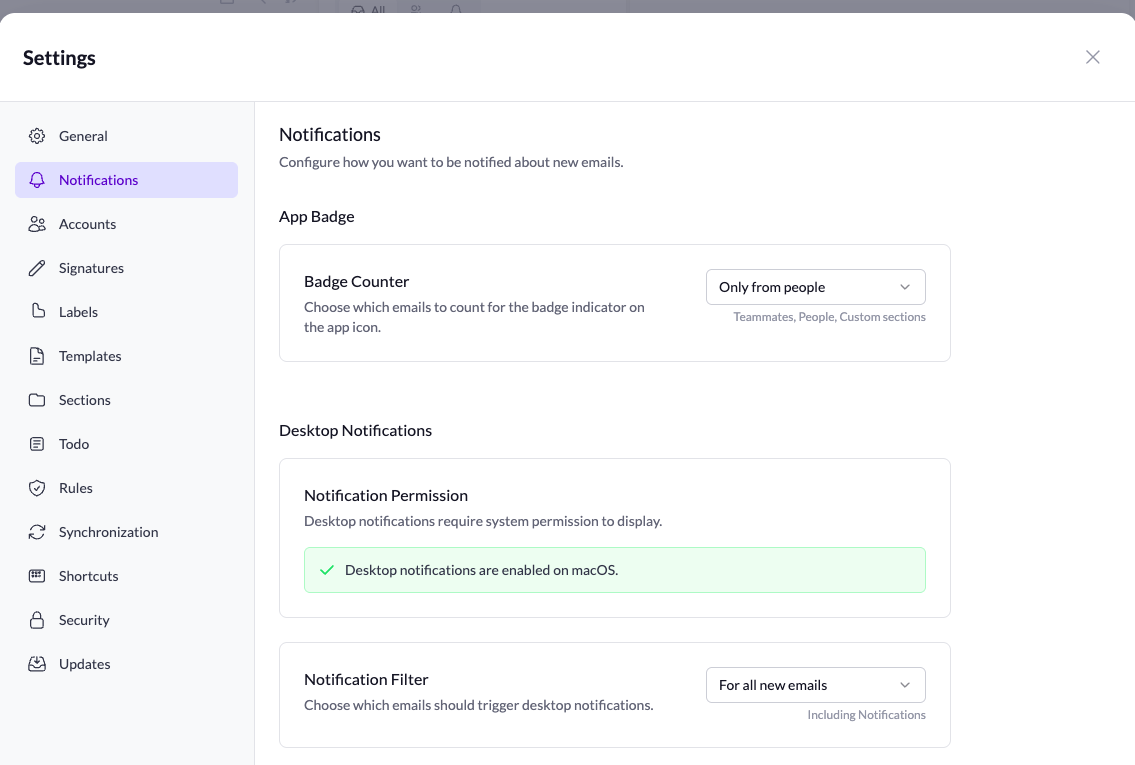
🔔 Desktop Notifications & Badge
You now have full control over how Talanoa notifies you about new emails:
- Desktop notifications - Get notified when new emails arrive
- App icon badge - See unread count at a glance
Configure it your way:
- No notifications - Stay focused, check emails on your own terms
- Only from people - Get notified for real contacts, ignore automated emails
- All new emails - Never miss a thing
Your inbox, your rules. Find these settings in Preferences.
🖼️ Trust Images from Contact
Tired of clicking “Load images” for contacts you trust? Now you can mark a sender as trusted and their images will load automatically in future emails.
One click, and you’re done. No more repetitive approvals for people you know.

Bug fixes & improvements
🐛 Fixes & Improvements
- Label page shows all messages by default - No more empty views when opening a label
- Label management fixed for IMAP & Outlook - Labels now sync properly across all account types
- Blocking removes sender instantly - Block someone in your Inbox and they disappear from the list immediately
- Keyboard shortcuts fixes - Various shortcut bugs squashed
Notes Upgrade & Composer Improvements - Workflow magic
📝 Notes Just Got Superpowers
Notes are now a powerhouse! We’ve added everything you need to manage them like a pro:
- Filter, sort, and search - Find exactly what you need, when you need it
- Assign labels - Organize your notes with the same label system you use for emails
- Convert to Todo - Turn any note into a task with one click. Ideas become action items instantly.
Your notes are no longer just a place to jot things down - they’re a full productivity system integrated with your email workflow.
✉️ Composer Improvements
We’ve made composing emails faster and smarter:
- Autocomplete in To field - Start typing and get instant suggestions from your contacts. No more hunting through your address book without clutter!
- Drag & drop recipients - Easily move recipients between To, CC, and Bcc by dragging them. It’s intuitive, it’s fast, it just works.
Composing emails should be effortless. These improvements make it feel that way.
🔄 Better Email Threading
When you send an email, you’ll now see it appear in the thread immediately. No refresh needed, no confusion - just instant feedback that your message was sent.
🗑️ Smarter Delete with Undo
Deleting emails just got a major UX upgrade:
- Delete without confirmation - No more annoying popups interrupting your flow
- Success notification with Undo - Changed your mind? Click Undo to bring it back
- Keyboard shortcut support - Press CMD+Z (Mac) or CTRL+Z (Windows/Linux) to undo your last delete
Fast deletions when you need them, safety net when you don’t. This is how delete should work.
Small improvements, big impact on your daily workflow. This is what we’re here for! 🚀
Referral Program - Help us grow, unlock perks
🎁 Referral Program - Let’s Grow Together!
This is a big one! You can now share Talanoa with the world, and we’re SO excited about what this means for the project.
Why this matters:
- More users = More features - As our community grows, we can invest more in building the features you want
- Better experience for everyone - A thriving community means more resources for improvements, faster bug fixes, and better support
- You’re part of the journey - Help shape Talanoa’s future by bringing in people who’ll love it as much as you do
Share Talanoa, grow the community, and watch the app get better with every new user. This is how indie products become great - together.
✉️ “Sent via Talanoa” Signature
Every email you send from Talanoa now includes a small “Sent via Talanoa” tag below your signature. It’s a subtle way to spread the word and help others discover the app.
Don’t want it? No problem! You can disable it in settings. Your emails, your choice.
🏆 Earn Points, Unlock Perks
Here’s the fun part: Earn points for every referral!
These points aren’t just for show - you’ll be able to use them to unlock:
- Future perks - Exclusive features and benefits
- Advanced features - Premium functionality as we build it
- Customization options - Make Talanoa even more yours
The more you share, the more you unlock. It’s our way of saying thank you for being part of this journey.
Building in public, growing together. Let’s make Talanoa amazing! 🚀
Customizable Todo & Attachment Downloads - Make it yours
📁 Default Download Folder
You can now set your preferred default folder for downloading attachments! No more hunting through your Downloads folder - choose where attachments go and they’ll always land exactly where you want them.
Set it once, forget about it. Your workflow just got a little smoother.
📋 Customize Todo Columns
Todo just got a major upgrade! You now have full control over your Todo columns:
- Reorder columns - Drag and drop to organize them exactly how you want
- Edit existing columns - Rename, adjust settings, make them work for you
- Add new columns - Create custom columns that fit your workflow
Your Todo view, your way. Whether you’re tracking projects, priorities, or custom workflows, you can now build the perfect setup for how you work.
Labels, Rules & Sidebar Redesign - Your inbox just got superpowers
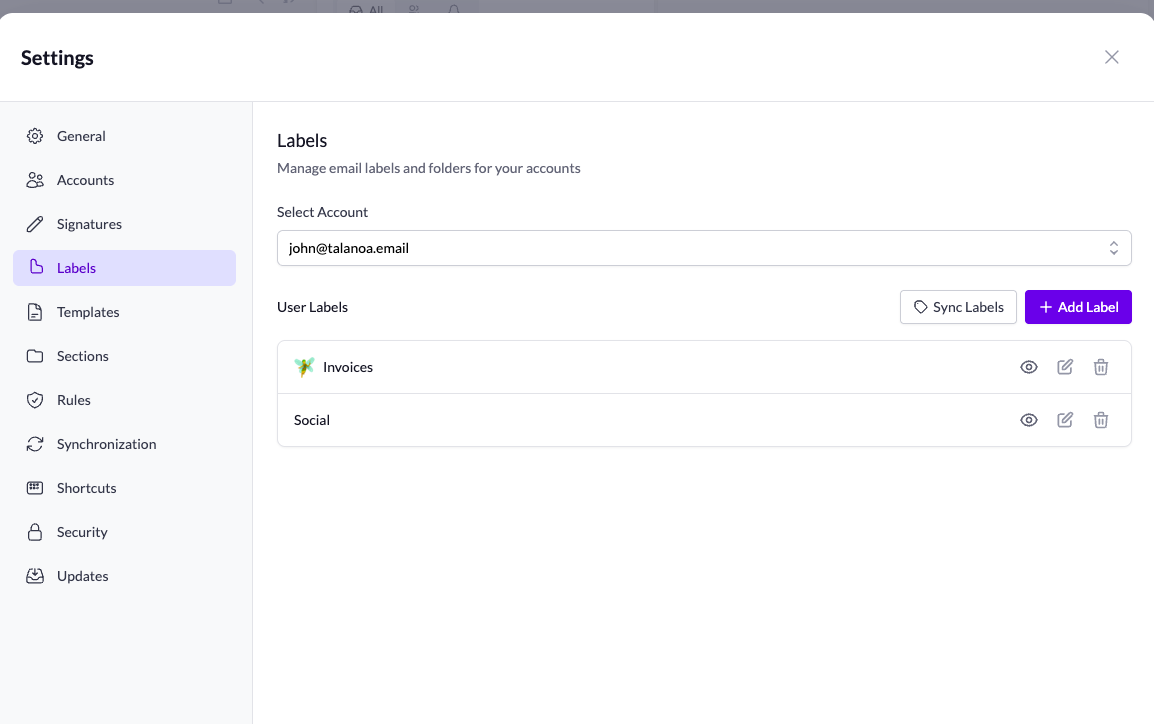
🏷️ Labels Management - Finally!
This one’s been highly requested, and we’re SO excited to ship it! You can now fully manage your labels in Talanoa.
What you can do:
- Sync labels from Gmail and other providers - All your existing labels are automatically synced
- Choose which labels to display - Customize your sidebar by selecting exactly which labels you want to see. Keep it clean, keep it organized, keep it yours.
No more clutter. No more scrolling through dozens of labels you never use. Just the ones that matter, right where you need them.
⚡ Rules Management - Automate Your Life
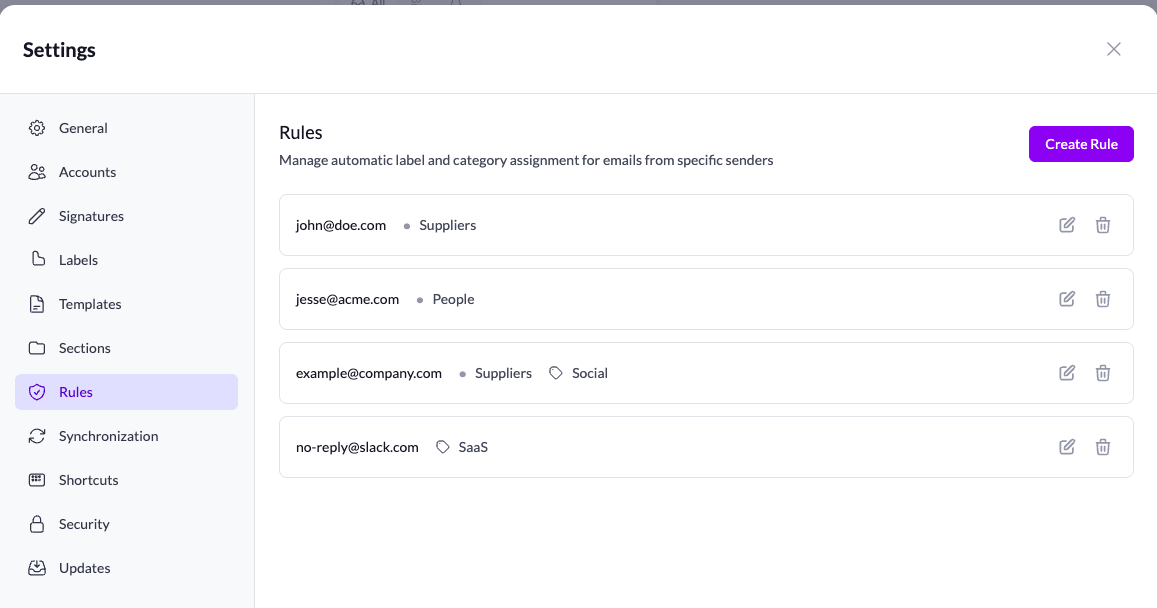
Set it and forget it! Create rules to automatically apply labels based on the sender.
Got a newsletter you want to auto-label? Done. Important client emails that need special tagging? Easy. Your inbox organizes itself while you focus on what matters.
This is the kind of feature that saves you hours every week. We’re genuinely excited about how much time this will give back to you.
🎨 Sidebar Redesign
We’ve updated the sidebar UI! You can now switch between Inbox, Todo, and Calendar (coming soon - we’re working on it! 🔜).
The new design is cleaner and makes it easier to navigate between different views.
✨ Quality of Life Improvements
We’ve been listening to your feedback, and here are some small but mighty improvements:
- Choose your reply style - You can now choose to reply all or send a simple reply to just the sender. No more accidental “reply all” moments!
- Switch accounts in Todo - Working with multiple accounts? You can now directly switch between them right from the Todo view. Seamless multi-account workflow unlocked.
Building in public, shipping fast, listening to you. This is what indie hacking is all about! 🚀
Message Templates & Empty Trash - Work smarter, not harder
📝 Message Templates are here!
Massive productivity boost incoming! You can now create and use pre-registered email templates to save time on repetitive messages.
Whether you’re sending follow-ups, standard responses, or frequently used messages, templates let you compose emails in seconds instead of minutes. Just select your template, customize if needed, and send. Your productivity just got a serious upgrade.
🗑️ Empty Trash
Clean up your email storage for good! The new “Empty Trash” feature lets you permanently delete all emails in your trash folder, freeing up space and keeping your account tidy.
🐛 Bugfix
- Fixed UI issues on custom sections
Reorder custom sections + link detection fix
🔄 Reorder custom sections
You can now reorder your custom sections! Drag and drop to organize them exactly how you want. Your inbox, your way.
🐛 Bugfix
- Fixed link detection in email content - Links in emails are now properly detected and clickable.
Lifetime deal available + bug fixes
💰 New pricing: Lifetime deal
We’ve added a lifetime deal option! Pay once, use forever. No subscriptions, no recurring fees.
🐛 Minor bugfixes
- Fixed auto-detect links in email content - Links in emails now properly detect and work as expected
- Fixed search in emoji picker for custom sections - The emoji search now works correctly when creating custom sections
- Edit notes are now resizable - Resize your note editing window to fit your workflow
- Global search is now stateful - When you reopen the search, it remembers your previous query and results. No more losing your place!
Account overview on hover - Quick inbox peeks without leaving your flow
👀 Account overview on hover
We’ve added a powerful new way to quickly check what’s happening in your other inboxes without disrupting your current workflow. Simply hover over any account in the sidebar to see a preview of the latest emails from that inbox.
Why this matters:
- Stay in context - No need to switch accounts just to check if something important arrived
- Faster triage - Quickly see if an inbox needs attention before committing to a full switch
- Better workflow - Keep your current state intact while staying aware of what’s happening elsewhere
This is especially useful when you’re deep in a focused email session but want to keep an eye on other accounts. Just hover, peek, and decide whether it’s worth switching - all without losing your place.
Stay aware, stay focused. That’s the Talanoa way.
