How to change the language of Talanoa
Talanoa speaks English and French. Pick one in Settings, and choose how dates and times look too.
- Time needed
- Less than 1 minute
- What you need
- Talanoa
Bonjour, hello 👋
Talanoa speaks two languages today: English and French.
By default, it simply copies your computer. If your computer speaks French, Talanoa speaks French. If it speaks English (or a language Talanoa doesn’t know yet), Talanoa speaks English.
But you’re the boss. You can pick a language yourself in a few seconds.
Step 1: Open the language setting
- Click the gear at the bottom left of the window, then Settings. (Or press
Cmd+,on Mac,Ctrl+,on Windows and Linux.) - Stay on General and scroll down to Appearance.
- Find Language.
Step 2: Pick your language
- Click the menu next to Language.
- Choose one:
- System language (automatic): Talanoa follows your computer.
- English
- Français
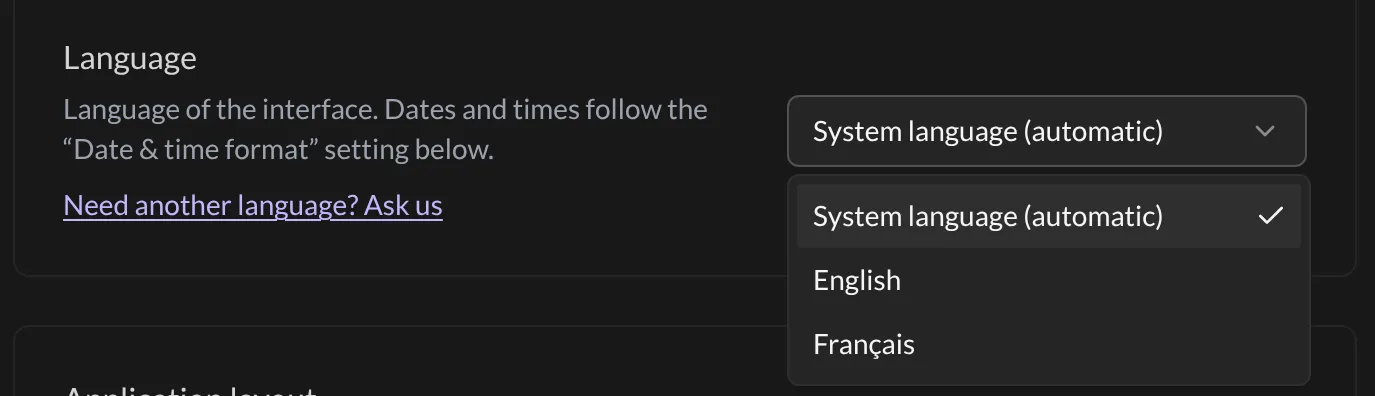
And… that’s it! 🎉 The whole app switches right away: menus, buttons, settings, even the notifications. No restart needed. Magique.
Dates and times have their own setting
The language changes the words. The way dates look has its own setting, just below: Date & time format.
By default it follows your computer too. You can pick another style, for example English (UK) if you like “17 Oct” better than “Oct 17”, or Deutsch, Español, 日本語 and many more. You’ll see an example right under the setting before you choose.
Your language is missing?
Right under Language, click Need another language? Ask us. It opens an email to us. Tell us which language you’d like. The more people ask, the sooner it comes.
Good to know
- The language of the app doesn’t change your emails. A German email stays in German.
- Want help reading emails in other languages? See Summaries & translations.
Something went wrong?
“Talanoa is in English but my computer is in Spanish.” That’s normal for now. Talanoa only speaks English and French, so for other languages it uses English. Ask us for yours with Need another language? Ask us.
“The words changed, but the dates still look American.” Dates follow the Date & time format setting, not the language. Pick the style you like there.
Still stuck? Write to us at [email protected]. A real human will answer.
