How to invite friends and earn points
Share your personal Talanoa link with friends. Every time someone joins through it, you earn points.
- Time needed
- About 1 minute
- What you need
- Talanoa, and a friend drowning in emails
Sharing is caring 🎁
Know someone whose inbox looks like a messy bedroom? You can invite them to Talanoa with your own personal link.
Every time someone joins Talanoa through your link, you earn +100 points. Your points will unlock future exclusive perks. Think of it as a piggy bank that fills up every time you help a friend.
When your friend opens your link, they land on a page that says you invited them, with a button to download Talanoa for free.
Step 1: Find your link
- Click the gift icon at the bottom of the left bar.
- The Share Talanoa window opens. Your personal link is under Your refer link.
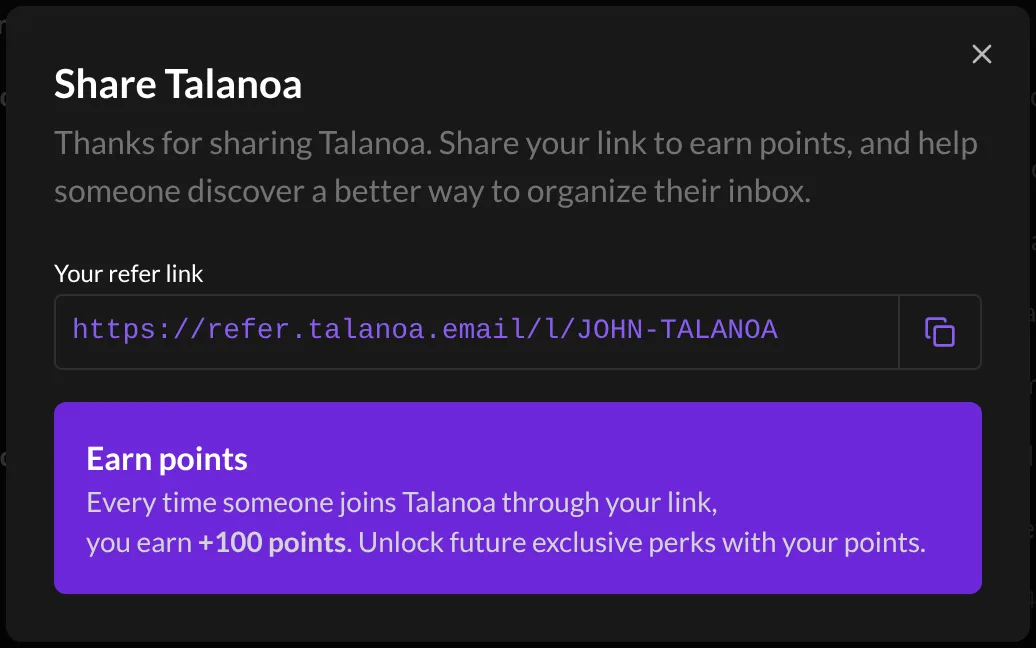
You can also get there from Settings → General: click Share Talanoa at the top right.
Step 2: Copy it and send it
- Click the copy button next to your link. Talanoa says Refer link copied to the clipboard.
- Paste the link anywhere: an email, a chat, a text message, a carrier pigeon.
And… that’s it! 🎉 When your friend joins through your link, the points land in your piggy bank.
See your points
Open Settings → General. Your total is at the top, next to Your points:.
Bonus: let your emails do the inviting
Talanoa can add a small “Sent using Talanoa” line under your signature. It links to Talanoa, and you earn points on every referral that comes from it.
You’ll find it in Settings → Signatures, under Share Talanoa, get rewarded. It’s on by default. On the free plan, turning it off is a Talanoa Pro feature. See Set up your signatures.
Questions you might have
“What can I do with my points?” Points will unlock future exclusive perks. We’re cooking them up right now. Keep collecting!
“Does my friend have to pay anything?” No. Talanoa is free to start, with no credit card needed. Your friend can try it at their own pace.
“I shared my link but my points didn’t move.” Points come when someone actually joins through your link, not just when they open it. Make sure they used your link, not a plain search for Talanoa.
Still stuck? Write to us at [email protected]. A real human will answer.
