The Today view
Your home base in Talanoa: every email in order, newest on top, with days clearly marked and the noise folded away.
- Time needed
- About 2 minutes to read
- What you need
- Talanoa, with at least one email account connected
Your home base 🏠
The Today view is the first thing you see when you open Talanoa. In the sidebar, it’s simply called Inbox.
It’s your email, in order, newest on top. Like a newspaper that prints a fresh page every morning: today’s news first, yesterday’s just below.
To come back to it from anywhere, click Inbox at the top of the sidebar, or press G then H on your keyboard.
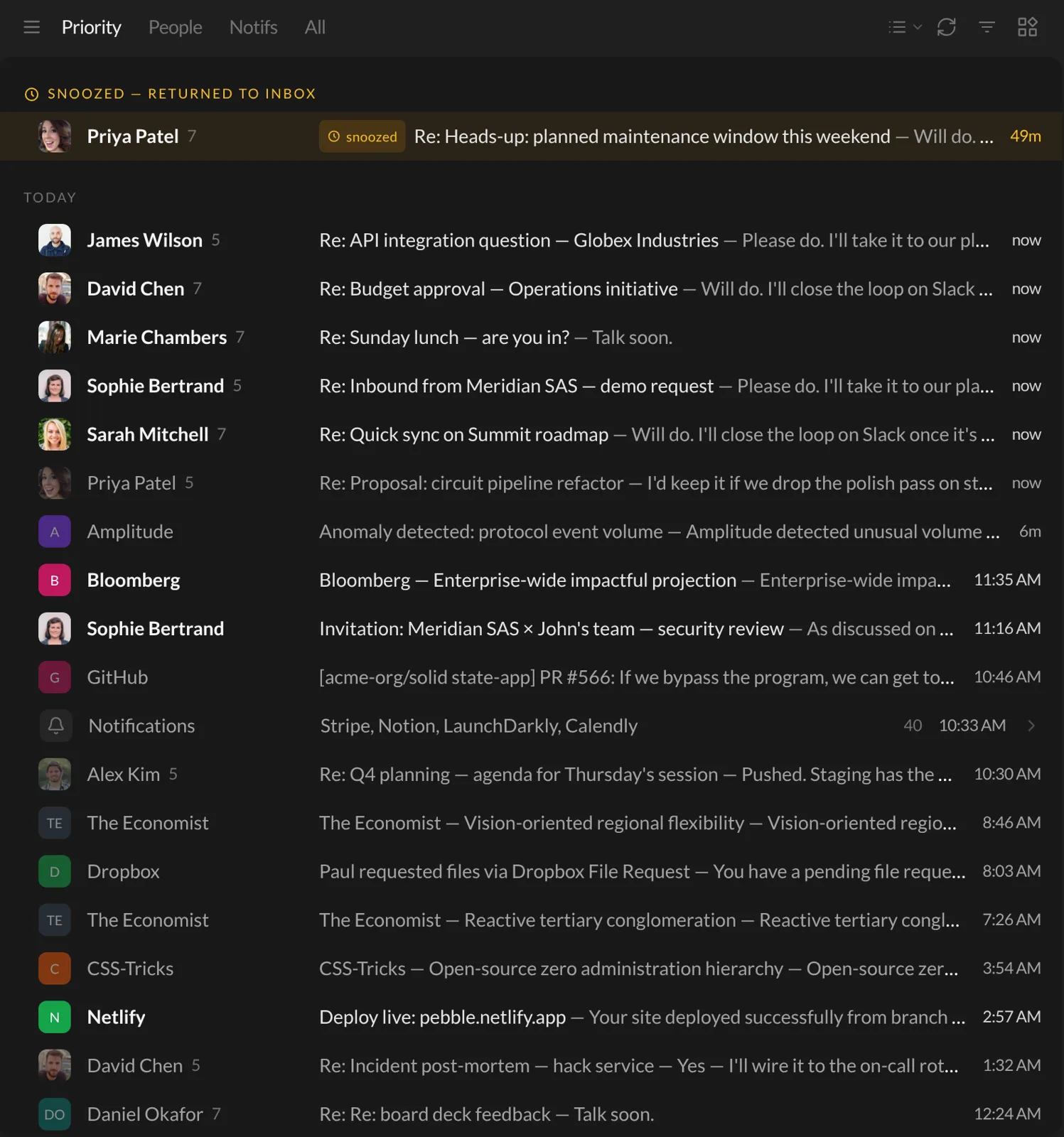
What you’ll see
Days, clearly marked. Emails are grouped under little headers: Today, Yesterday, then the day and date. Easy to see what’s new.
One row per conversation. A small number next to a name means several messages in that conversation. Prefer one row per message? Turn off Group messages by conversation in Settings → General.
Snoozed emails come back on top. An email you snoozed shows up under Snoozed — returned to inbox when its time comes, so you can’t miss it. More in Snooze an email.
Notifications folded into one row. On the Priority tab, all those app alerts and newsletters are squeezed into a single Notifications row. Click it to open them. Want to know how Talanoa tells people from robots? Read How Talanoa sorts your emails.
Keep scrolling and older emails keep loading. No “next page” button.
Work through your emails
- Click an email to open it.
- Use the
↓and↑arrow keys to move to the next or previous one. - Move your mouse over an email in the list to see quick buttons: archive, snooze, add a label, move to trash.
Sent something to the trash by mistake? A message pops up with Undo. Phew.
Filter the list
At the top right of the inbox, the filter button (three lines getting shorter) has two switches:
- Unread only: hide everything you’ve already read.
- Archived only: look back at emails you’ve archived.
Talanoa remembers your filters for each account, even after a restart.
Next to it, the round arrows button (Pull new messages) checks for new emails right now. Talanoa already does this on its own, but sometimes you just want to press the button. We get it.
Good to know
- The four words at the top (Priority, People, Notifs, All) change which emails you see. They’re explained in How Talanoa sorts your emails.
- Prefer a calmer view with only your unread emails, grouped by type? Try the Smart Inbox.
- The cards on the right (your day, a scratchpad, your tasks) are widgets. See Your Zen dashboard.
GthenHis the default shortcut. You can change it in Settings → Shortcuts.
Questions you might have
“I can’t find the Today view in the sidebar.” It’s the Inbox line at the very top. Same thing, shorter name.
“My inbox looks empty.” Check the filter button at the top right. If Unread only or Archived only is on, it’s turned purple. Switch it off.
“I don’t see the Priority, People, Notifs and All words.” You’re probably in the Smart Inbox. Open the Inbox & layout menu at the top right and pick Classic list.
Still stuck? Write to us at [email protected]. A real human will answer.
