How to manage your subscription
Upgrade to Talanoa Pro, change your payment details, or cancel. All from one menu, in a couple of clicks.
- Time needed
- About 2 minutes
- What you need
- Talanoa, and a payment card if you're upgrading
Your plan, your choice
Everything about paying for Talanoa lives in one place: a menu at the bottom left of the window. Upgrade, update your payment details, cancel. No phone calls, no “are you really sure?” maze.
Not sure you need Pro? Read Free vs Pro first. The free plan is yours forever.
Step 1: Upgrade to Pro
There are two easy ways to start.
If you just bumped into a Pro feature: Talanoa shows the Unlock Pro window. You’re already in the right place.
If you’re on a Pro trial: click the little countdown ring at the bottom left of the window, then click Subscribe to Pro.
Then:
- Pick Monthly or Yearly. Yearly costs less per month.
- Click Upgrade now.
- A secure payment page opens in your web browser. Enter your card details there and confirm.
- Come back to Talanoa.
And… that’s it! 🎉 Pro switches on by itself, usually within a few seconds. The upgrade window even closes on its own. Polite little app.
For the current prices, see Talanoa Pro.
Step 2: Change your payment details, or cancel
- Click the gear icon at the very bottom of the left bar.
- Click Billing & Subscription.
- Talanoa says Opening portal… for a second, then your billing page opens in your web browser.
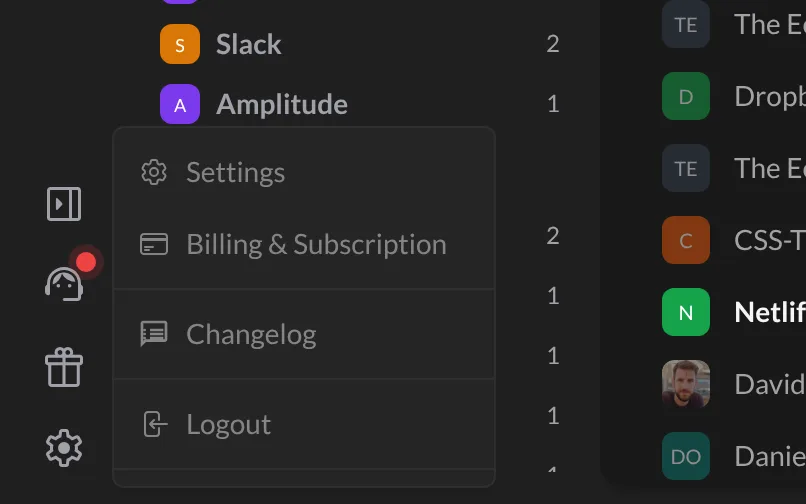
That billing page is where you manage your payment details and your subscription, including cancelling it.
Cancelling
You can cancel any time, from the billing page above. No long-term commitment.
When you cancel, you keep Pro until the end of the period you already paid for. After that, Talanoa moves to the free plan. Your emails stay right where they are. Your extra accounts stay in the app too, just greyed out until you come back.
Your emails are never held hostage. Free or Pro, your emails stay on your computer and with your email provider. Stopping Pro never deletes them.
Something went wrong?
“I paid, but Talanoa still shows the Pro window.” Give it a minute, then close the window and try the Pro feature again. Still nothing? Quit Talanoa and open it again.
“Nothing happens when I click Billing & Subscription.” Check your internet connection, then try again. The page opens in your web browser, so look for a new browser window or tab.
“Is there a lifetime deal?” Not right now. Talanoa Pro is a monthly or yearly subscription. See the pricing page.
Still stuck? Write to us at [email protected]. A real human will answer.
