How to deal with spam
Find your spam, rescue the good emails that ended up there by mistake, send pesky senders to spam, and empty it all in one click.
- Time needed
- About 2 minutes
- What you need
- Talanoa, and maybe a long-lost prince who wants to send you money
Your inbox has a bouncer 🛡️
Spam is junk email. Fake lottery wins. Miracle pills. A prince who really needs your bank details.
Your email provider already catches most of it, like a guard at the door. Suspicious emails don’t go to your inbox. They go to a separate room called Spam.
Talanoa shows you that room, so you can peek inside, rescue a good email that got caught by mistake, or throw everything away.
Step 1: Open your Spam
- Click the menu button (☰) at the top of your email list.
- Click Spam.
You see every email that was put aside as spam. Nothing there? You’ll see No spam in sight. Lucky you.
Step 2: Rescue a good email
Sometimes the guard is a bit too strict, and a real email ends up in spam. Your dentist. A friend with a new address.
- Move your mouse over the email in your Spam list.
- Click the ⋮ button that appears on the right.
- Click Not a spam.
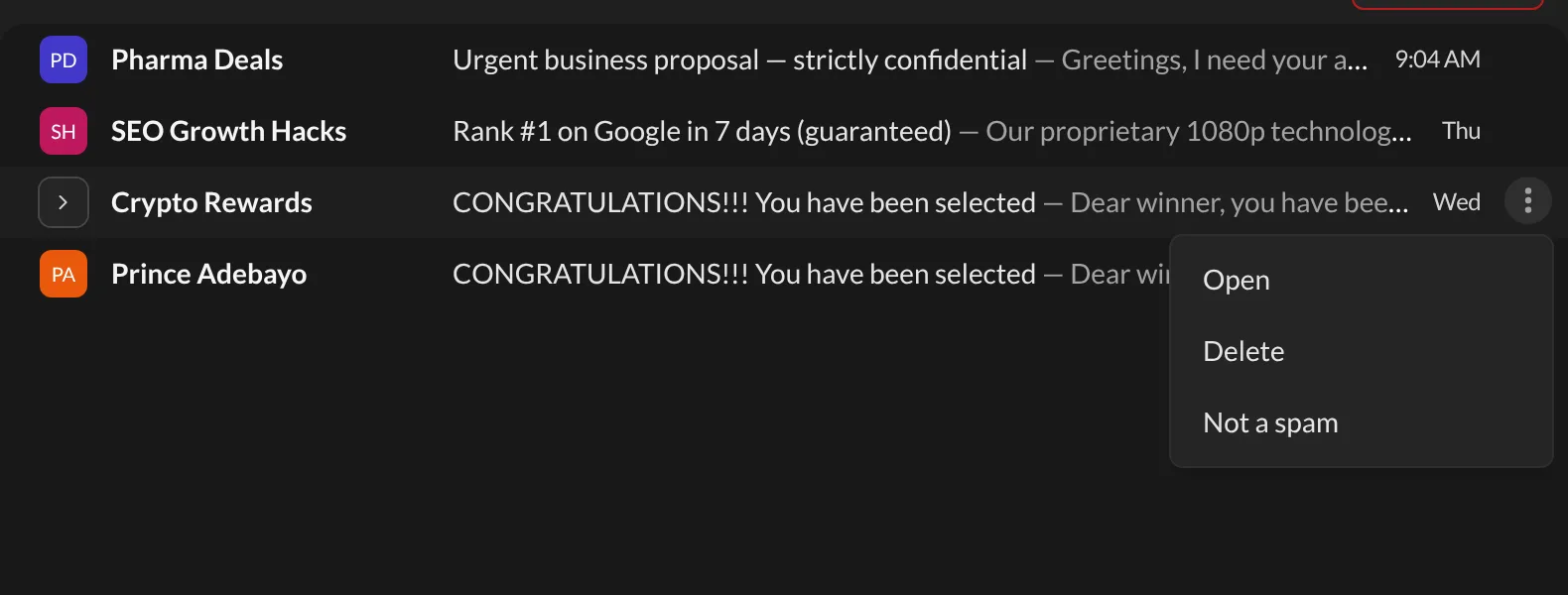
The email goes back to your inbox. If you had sent that sender to spam yourself before, Talanoa forgets that too.
Step 3: Send a sender to spam
A sender keeps slipping into your inbox and you know it’s junk? Send them to the spam room yourself.
- Click the sender’s name in the left sidebar. A panel opens on the right.
- Under More, click Move to section.
- Click Move to Spams.
All their emails go to spam, and Talanoa remembers this choice for that sender.
Want them gone for good instead? Spam keeps their emails in a separate room. If you never want to see them again, block the sender: their emails go straight to the trash.
Step 4: Empty your spam
- Open Spam (☰ menu, then Spam).
- Click the red Trash all button at the top right.
- Choose:
- Move to trash folder: everything goes to your Trash, where you can still change your mind.
- Delete permanently: everything is gone forever. No way back.
- Talanoa asks if you’re sure. Click OK.
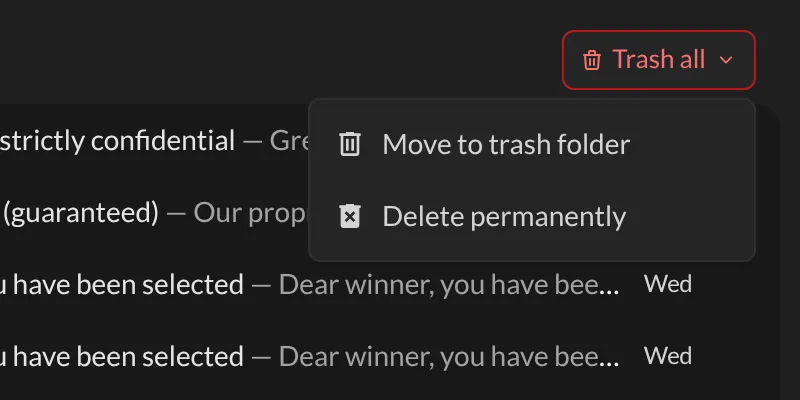
And… that’s it! 🎉 Spam room: squeaky clean.
Something went wrong?
“An important email went to spam.” Open Spam, then click ⋮ and Not a spam on that email (see Step 2). It goes back to your inbox.
“I deleted my spam permanently, and now I need an email.” Sorry, Delete permanently really means forever. Next time, pick Move to trash folder, which gives you a second chance.
“Spam keeps coming from the same sender.” Block the sender. Their future emails will skip your inbox and land in the trash.
Still stuck? Write to us at [email protected]. A real human will answer.
